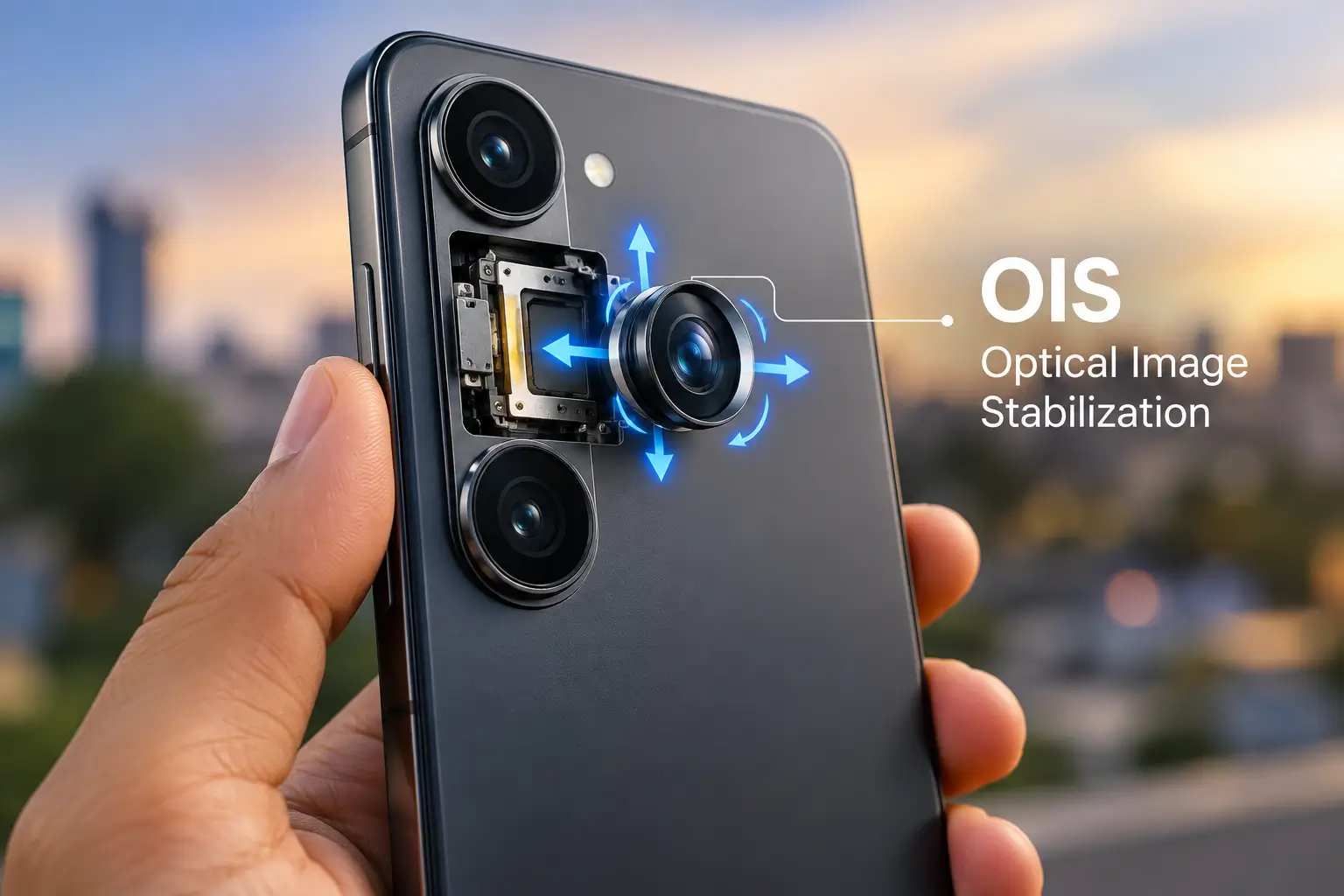
If you have compared smartphone cameras recently, you have probably seen the term “OIS camera“ in a specification sheet.
OIS stands for Optical Image Stabilization. In simple terms, it is a hardware-based stabilization system that detects small movements of the camera and physically moves an optical element or the image sensor to compensate for that movement. The goal is to reduce blur caused by camera shake.
That sounds straightforward, but OIS is often misunderstood.
It does not automatically make every photograph sharper. It cannot freeze a person who is running across the frame. It does not increase a camera’s megapixel count. And having OIS on one camera does not necessarily mean every camera on the phone has OIS.
For smartphone buyers, the more useful question is:
What does OIS actually improve, and when does it make a noticeable difference?
OIS camera: quick answer
An OIS camera uses physical movement inside the camera module to counteract small camera movements during shooting.
This is particularly useful when:
- You are shooting in low light.
- The camera needs a slower shutter speed.
- You are using a telephoto lens.
- You are taking handheld photographs indoors.
- You are recording handheld video.
- Your hands are not perfectly steady.
OIS is most useful for camera movement, not subject movement.
If you photograph a stationary building at night, OIS can help compensate for your hand movement during a longer exposure.
If you photograph a person running at night, OIS can reduce blur caused by your hands, but the person’s movement can still create motion blur.
That distinction is fundamental to understanding OIS.
What is OIS camera?
OIS means Optical Image Stabilization.
It is a mechanical stabilization system built into a camera.
Depending on the design, the system can move:
- Lens elements
- The camera sensor
- Or another optical component
to counteract unwanted camera movement. Qualcomm describes smartphone OIS as moving either the image sensor or an optical element to counter camera shake.
Sony similarly explains that smartphone OIS can keep the lens unit in a floating state and move it to correct camera shake and reduce image blur.
The important word is optical.
The stabilization is happening through physical hardware rather than relying only on software after the image or video has been captured.
How does an OIS camera work?
Think about what happens when you hold a smartphone in your hand.
Your hand is never completely motionless.
There are tiny movements caused by:
- Muscle tremors
- Breathing
- Hand position
- Accidental movement
- Pressing the shutter
- Holding the phone at an awkward angle
In bright daylight, these movements may not matter much because the camera can often use a fast shutter speed.
In darker conditions, the camera may need more time to collect enough light.
A small movement during that exposure can turn into visible blur.
OIS is designed to counter that movement.
The basic process
1. Sensors detect movement
The camera system detects changes in the phone’s movement or orientation.
2. The stabilization system calculates compensation
The camera electronics determine how the optical system should move to counteract the detected movement.
3. A lens or sensor moves
Tiny mechanical actuators shift the optical element or image sensor in the opposite direction.
4. The image remains more stable during exposure
The compensation reduces the effect of camera shake.
Nikon describes a similar stabilization principle in its lens-based VR systems: angular-velocity sensors detect movement, a processor determines the required correction and motors move selected lens elements to compensate. Smartphone implementations vary by manufacturer, but the fundamental principle is similar.
Why does OIS help in low light?
This is probably the most important practical benefit of OIS for smartphone photography.
Imagine you are photographing a stationary subject in a dim restaurant.
The camera needs enough light to create an exposure.
One way to obtain more light is to use a longer shutter speed.
But a longer exposure gives your hands more opportunity to move while the image is being captured.
That can create camera-shake blur.
OIS helps by compensating for the camera’s movement during that exposure.
Samsung explicitly describes OIS as a system that detects hand movement and moves the lens in the opposite direction, with OIS contributing to clearer images in low-light conditions.
A simplified example
Imagine two otherwise similar cameras:
Camera A:
1/30-second handheld exposure without OIS
Camera B:
1/30-second handheld exposure with OIS
Camera B has a hardware system actively counteracting small camera movements.
That does not guarantee a sharp photograph, but it gives the camera a better chance of producing one.
The exact improvement depends on the phone’s stabilization system, sensor, lens, software and shooting mode.
OIS does not freeze moving subjects
This is one of the biggest OIS misconceptions.
Suppose you are taking a photograph of:
- A moving child
- A running dog
- A cyclist
- A moving car
- Someone dancing
There are two different types of movement:
Camera movement
Your hands move.
Subject movement
The person or object moves.
OIS primarily addresses camera movement.
It cannot physically stop the subject from moving.
For example, if a person moves quickly during a long exposure, their face or hands can still appear blurred even if your phone has excellent OIS.
This is why fast shutter speeds, autofocus performance, sensor capability and computational photography also matter for action photography.
Samsung’s camera guidance illustrates the same basic exposure principle: slow shutter speeds allow more light in but fast shutter speeds are better suited to fast-moving subjects.
OIS vs EIS: what is the difference?
The two terms are often displayed next to each other:
- OIS — Optical Image Stabilization
- EIS — Electronic Image Stabilization
They have different approaches.
| Feature | OIS | EIS |
|---|---|---|
| Full form | Optical Image Stabilization | Electronic Image Stabilization |
| Primary method | Physical optical/sensor movement | Digital/software correction |
| Hardware movement | Yes | Not necessarily |
| Particularly useful for | Handheld photos and low-light shooting | Video stabilization |
| Can be combined with the other? | Yes | Yes |
| Requires image cropping? | Not inherently | Often uses a crop/extra field of view |
| Handles camera shake? | Yes | Yes |
| Freezes moving subjects? | No | No |
Qualcomm explains that EIS/DIS can correct video shake by using motion information and shifting the recorded frame within the camera’s wider field of view.
Sony also documents hybrid systems that combine OIS and EIS simultaneously for video stabilization.
So which is better?
It is not really a simple “OIS wins” situation.
They solve stabilization in different ways.
A smartphone can use OIS + EIS together, and that combination can be more useful for video than relying on either technology alone.
The exact implementation differs from one phone to another.
What is hybrid stabilization?
Hybrid stabilization combines optical and electronic stabilization.
The basic idea is:
OIS handles physical camera movement + EIS performs additional digital correction.
Sony calls this hybrid image stabilization on supported Xperia devices and describes it as simultaneously combining OIS and EIS.
This can be particularly useful for video.
For example:
OIS:
Physically compensates for smaller camera movements.
EIS:
Uses electronic processing to further smooth the recorded video.
The result can be steadier footage than either system alone, depending on the implementation.
Does OIS improve video?
Yes, OIS can contribute to more stable video, but the result depends heavily on the phone.
Modern smartphones can combine OIS with EIS and other stabilization systems.
Google’s current Pixel hardware documentation, for example, lists optical image stabilization alongside fused, cinematic, locked and active video stabilization modes.
Samsung also distinguishes OIS from VDIS, its video digital image stabilization technology, on supported devices.
This illustrates an important point:
“This phone has OIS” does not tell you the complete story about video stabilization.
You also need to know:
- Which camera has OIS?
- Which video resolutions support it?
- Which frame rates support it?
- Is EIS also available?
- Is stabilization disabled in certain modes?
- Does the phone crop the video?
- Does stabilization change when you zoom?
Does every camera on a smartphone have OIS?
No.
This is another important buying consideration.
A smartphone with three rear cameras might have:
- OIS on the main camera
- OIS on the telephoto camera
- No OIS on the ultrawide camera
Or it might have OIS on only one camera.
Sony’s current Xperia documentation provides examples of specific lenses using hybrid stabilization rather than treating stabilization as a property of the entire phone.
Therefore, when a specification says:
“50MP OIS camera”
you should check exactly which camera module has OIS.
Do not assume that the entire camera system is optically stabilized.
Why telephoto cameras benefit from OIS
OIS can be particularly useful with telephoto cameras.
Why?
Because magnification also magnifies the visible effect of small camera movements.
Imagine pointing your phone at a distant building.
At 1×, a tiny hand movement may barely affect the composition.
At a high zoom level, the same movement can make the frame jump noticeably.
That makes stabilization especially useful for longer focal lengths.
This is one reason manufacturers sometimes provide OIS on both the main and telephoto cameras.
Samsung, for example, has offered multi-camera systems with OIS on wide and telephoto cameras.
OIS does not make a bad camera good
This is perhaps the most important buying lesson.
A phone can have OIS and still take mediocre photographs.
Camera quality depends on a combination of:
- Sensor size
- Sensor quality
- Lens quality
- Aperture
- Autofocus
- Image signal processor
- Computational photography
- HDR processing
- Noise reduction
- White balance
- Colour processing
- Dynamic range
- Software tuning
- Stabilization
OIS is only one part of the system.
A 200MP camera without OIS can sometimes produce better photographs than a lower-resolution OIS camera if the sensor, optics and processing are substantially better.
Conversely, adding OIS to a capable camera can improve its consistency, particularly in situations where camera shake is a limiting factor.
Samsung’s own current camera guidance describes modern smartphone photography as a combination of sensor hardware, optical stabilization, AI processing, night photography and multiple camera types rather than one specification alone.
OIS vs megapixels
A common smartphone-shopping mistake is comparing:
200MP vs 50MP
and ignoring:
OIS vs no OIS
Megapixels and stabilization measure completely different things.
Megapixels
Describe the number of pixels captured by the sensor.
OIS
Deals with camera movement during capture.
Therefore:
More megapixels ≠ less camera shake.
And:
OIS ≠ more megapixels.
A camera needs good optics, a capable sensor and effective image processing in addition to stabilization.
This is why camera specifications should be read as a system rather than a collection of isolated numbers.
What are the main benefits of OIS?
1. Reduced camera-shake blur
This is the fundamental purpose of OIS.
2. Better handheld low-light photography
OIS can make it easier to capture sharp images when longer exposures are required.
3. More stable handheld video
OIS can reduce certain forms of shake during video recording.
4. Better zoom stability
It is particularly useful when using telephoto cameras or higher magnification.
5. More forgiving handheld shooting
You do not have to keep the phone perfectly motionless for every photograph.
What OIS cannot do
OIS has limits.
It cannot:
- Freeze a moving person
- Turn a poor sensor into a premium sensor
- Replace good autofocus
- Replace a tripod for long exposures
- Guarantee sharp photos
- Guarantee smooth cinematic video
- Increase megapixel resolution
- Improve composition
- Replace good lighting
- Make every camera on a phone stabilized
Understanding these limitations prevents OIS from becoming another marketing specification that buyers interpret too broadly.
OIS vs tripod
A tripod and OIS solve the same broad problem—camera movement—but in very different ways.
OIS
Compensates for small movements while the phone is being held.
Tripod
Physically holds the camera in a stable position.
For very long exposures, astrophotography, night landscapes or deliberate long-exposure photography, a tripod can still be preferable.
Interestingly, some camera systems detect tripod use and alter stabilization behaviour depending on the situation. Nikon documents tripod and panning detection in its VR systems.
Smartphone behaviour varies by manufacturer and camera mode, so users should follow the phone’s own documentation.
Can you hear a small rattling sound from an OIS camera?
Sometimes, yes.
This can surprise smartphone owners.
Because OIS involves a movable optical component, the camera module can make a small rattling sound when the phone is shaken while the camera is inactive.
Samsung explains that this can occur because the OIS component can move inside the camera module when the device is shaken.
Sony gives a similar explanation and describes the movement as a mechanical characteristic of OIS-equipped smartphones rather than automatically indicating a defect.
So a faint rattle by itself does not necessarily mean something is broken.
However, if the phone has been dropped or the camera is malfunctioning, the situation should be evaluated separately.
OIS and Night Mode are not the same thing
Another common misconception is that OIS and Night Mode are interchangeable.
They are not.
OIS
A hardware stabilization system.
Night Mode
A computational photography mode that can use multiple frames, exposure changes and image processing to create a brighter or cleaner low-light image.
Modern phones can use both.
Samsung’s current Nightography documentation, for example, describes multi-frame processing that combines usable frames while rejecting blurry or noisy frames.
That means a modern low-light photograph can depend on several technologies simultaneously:
Sensor + lens + OIS + shutter control + multi-frame processing + noise reduction + HDR/AI processing.
OIS is one component of that pipeline.
How to check whether a phone has OIS
The easiest method is to check the manufacturer’s official specifications.
Look for:
- OIS
- Optical Image Stabilization
- Optical Image Stabilisation
- Sensor-shift stabilization
- A manufacturer-specific stabilization name
But don’t stop at the word “stabilization.”
A specification that simply says “image stabilization” may not tell you whether the phone uses OIS, EIS or a hybrid system.
Check these four things
1. Which camera has OIS?
Main camera? Telephoto? Both?
2. Does OIS work for photos?
Usually yes on supported modules, but verify the specific model.
3. Does OIS work for video?
Check the supported resolution and frame-rate combinations.
4. Is EIS also included?
A phone combining OIS and EIS may use a different stabilization system for different video modes.
How to test OIS yourself
A simple test can give you a rough idea, although it is not a laboratory measurement.
Test 1: Camera preview
Open the main camera.
Hold the phone steady and gently move your hand.
Watch the preview for how the camera responds.
Test 2: Low-light stationary subject
Photograph a stationary object indoors under relatively dim light.
Take several shots.
Then compare results with a phone without OIS under similar conditions.
Test 3: Video
Record while slowly walking.
Compare the amount and character of shake.
Test 4: Zoom
Use the telephoto camera or optical zoom.
Small movements should become more obvious, making stabilization easier to evaluate.
But remember that software stabilization, frame rate, crop and camera processing can affect the result.
A casual test cannot establish the exact performance of an OIS system.
Is OIS important when buying a smartphone?
For many camera-focused buyers, yes, OIS is a useful feature to prioritize.
It becomes particularly relevant if you frequently take:
- Night photographs
- Indoor photographs
- Handheld portraits
- Travel photographs
- Concert photographs
- Zoomed photographs
- Handheld videos
But it should not be your only camera-selection criterion.
A better decision framework is:
If photography is important
Look at:
Sensor + lens + OIS + autofocus + image processing
rather than OIS alone.
If video is important
Look at:
OIS + EIS + supported resolutions + frame rates + microphone/audio quality
If zoom is important
Check:
Actual telephoto hardware + OIS on the telephoto camera
rather than relying on a large “100×” or “200×” digital zoom number.
OIS camera buying checklist
Before buying a smartphone because it advertises OIS, check these points:
| Question | Why it matters |
|---|---|
| Which camera has OIS? | OIS may apply to only one lens |
| Is it optical or electronic stabilization? | The technologies work differently |
| Does video use OIS? | Photo stabilization does not tell the entire video story |
| Is EIS also available? | Hybrid stabilization can provide additional correction |
| What is the sensor size? | Stabilization cannot compensate for every hardware limitation |
| What is the lens aperture? | Lens design affects low-light performance |
| How good is autofocus? | OIS cannot fix missed focus |
| Is there a telephoto lens? | Real optical zoom is different from digital crop |
| Does Night Mode use multi-frame processing? | Low-light image quality depends on more than OIS |
| Are reviews consistent? | Specifications do not always predict real-world results |
OIS camera: facts vs common misconceptions
| Claim | Reality |
|---|---|
| OIS means better photos in every situation | Not necessarily |
| OIS reduces camera shake | Yes |
| OIS freezes moving people | No |
| OIS helps in low light | Often, yes |
| OIS improves video stability | It can |
| OIS and EIS are identical | No |
| Every camera on an OIS phone has OIS | No |
| OIS increases megapixels | No |
| OIS replaces Night Mode | No |
| OIS can work with EIS | Yes |
| OIS guarantees a great camera | No |
| Telephoto cameras can benefit strongly from OIS | Yes |
Why OIS matters more than a specification number suggests
The interesting thing about OIS is that it is not particularly impressive when described on a specification sheet.
“50MP camera” is easy to understand.
“1-inch sensor” sounds substantial.
“100× zoom” immediately communicates scale.
OIS is different.
Its value is mostly visible when conditions become difficult.
You notice it when:
- The restaurant is dark.
- You are taking a photograph at night.
- Your hands are slightly shaky.
- You zoom into a distant subject.
- You record handheld video.
In good daylight, almost any modern smartphone can produce a reasonably sharp photograph.
The harder test is what happens when the light drops or the magnification increases.
That is where stabilization becomes more valuable.
OIS is useful, but it is not a camera-quality shortcut
The best way to think about OIS is as an enabling technology, not a quality guarantee.
It removes or reduces one major problem: camera movement.
That gives the rest of the camera system a better opportunity to capture a usable image.
But the final photograph still depends on:
Light → sensor → lens → focus → shutter → stabilization → image processing
All of these interact.
A phone with OIS and a mediocre camera system can still produce mediocre photographs.
A phone with an excellent sensor, lens and computational photography system can sometimes produce excellent results even when stabilization is implemented differently.
Final takeaway
OIS camera means Optical Image Stabilization—a hardware system that physically compensates for small camera movements to reduce blur.
Its biggest practical advantages appear in handheld low-light photography, zoomed shooting and certain video situations.
But OIS is not magic.
It cannot freeze moving subjects, replace a tripod for every type of photography or guarantee that a smartphone has a great camera.
For Indian smartphone buyers, the smartest way to evaluate an OIS camera is to look at the whole imaging system:
OIS + sensor + lens + autofocus + processing + video stabilization.
If a phone has OIS on its main camera, that is a useful feature. If it combines OIS with good hardware and effective computational photography, its practical value can be much greater.
The next time you see “OIS camera” in a phone’s specification sheet, don’t simply read it as “better camera.”
Read it as:
“This camera has hardware designed to reduce the effects of camera shake.”
That is what OIS actually promises—and understanding that distinction makes it much easier to compare smartphone cameras intelligently.
FAQ
What is OIS camera?
OIS stands for Optical Image Stabilization. It is a hardware-based system that physically moves an optical component or image sensor to counteract camera movement and reduce blur.
What does OIS do in a mobile camera?
OIS primarily reduces the effects of hand movement while taking photographs or recording video. It is particularly useful when camera movement could cause blur, such as during handheld low-light photography.
Is OIS better than EIS?
They work differently. OIS uses physical optical or sensor movement, while EIS uses electronic/software-based correction. Modern smartphones can combine both, so it is not always useful to treat them as mutually exclusive technologies.
Does OIS help in low light?
Yes, OIS can be particularly useful in low-light photography because camera shake becomes more problematic when longer exposures are required. However, OIS does not eliminate blur caused by a moving subject.
Does OIS make video smoother?
OIS can reduce camera movement during video recording. Many phones combine OIS with EIS or other stabilization technologies to produce smoother video. The exact result depends on the phone and recording mode.
Does every camera on an OIS phone have OIS?
No. OIS is implemented at the camera-module level. A phone can have OIS on its main camera but not its ultrawide or front camera. Always check the specifications for each camera.
Does OIS mean a phone has a good camera?
No. OIS is only one part of a camera system. Sensor size, lens quality, autofocus, image processing, dynamic range and other technologies also affect image quality.
Should I buy a phone with OIS?
If smartphone photography is important to you, OIS is a useful feature to consider, particularly if you often shoot indoors, at night, at higher zoom levels or handheld video. But compare the complete camera system rather than choosing solely on the presence of OIS.