Choosing between web hosting plans can look deceptively simple. A hosting company may advertise a plan for ₹69, ₹149 or ₹199 per month, while another may charge several hundred or several thousand rupees.
The headline price, however, tells only part of the story.
The important questions are: How long does that introductory price last? What is the renewal price? How many websites can you host? How much storage and server capacity do you get? Are backups included? And when does shared hosting stop being sufficient?
Current Indian pricing pages show why those questions matter. Hostinger, BigRock, Bluehost and GoDaddy all offer different combinations of promotional pricing, renewal rates, storage, website limits and included services.
This guide explains how web hosting plans work and how to choose one based on the website you actually intend to run—not simply the biggest discount displayed on the pricing page.
Quick answer: which type of hosting do you need?
For most new websites, the decision can initially be simplified:
| Website type | Hosting to consider |
|---|---|
| Personal blog | Shared hosting |
| Small WordPress website | Shared or managed WordPress hosting |
| Small business website | Shared or managed WordPress hosting |
| Several small websites | Higher-tier shared hosting |
| Growing content website | Cloud hosting |
| Busy online store | Cloud or managed higher-performance hosting |
| Custom application | VPS or cloud hosting |
| Website requiring server-level control | VPS |
| Very high and predictable workload | Dedicated or advanced cloud infrastructure |
The important point is that more expensive hosting is not automatically better for every website.
A small blog does not normally need a dedicated server simply because a dedicated server has more CPU and RAM.
What is web hosting?
Web hosting is the infrastructure that stores the files, databases and other resources needed to make a website accessible online.
When someone visits your domain, the browser requests information from the server hosting your website. The server then delivers the required files and data.
A hosting account can therefore provide things such as:
- Server storage
- Database capacity
- Processing resources
- Website management tools
- SSL/HTTPS
- Backups
- Security features
- Domain-related services
- Content delivery or caching
- WordPress management tools
The exact combination depends on the hosting plan.
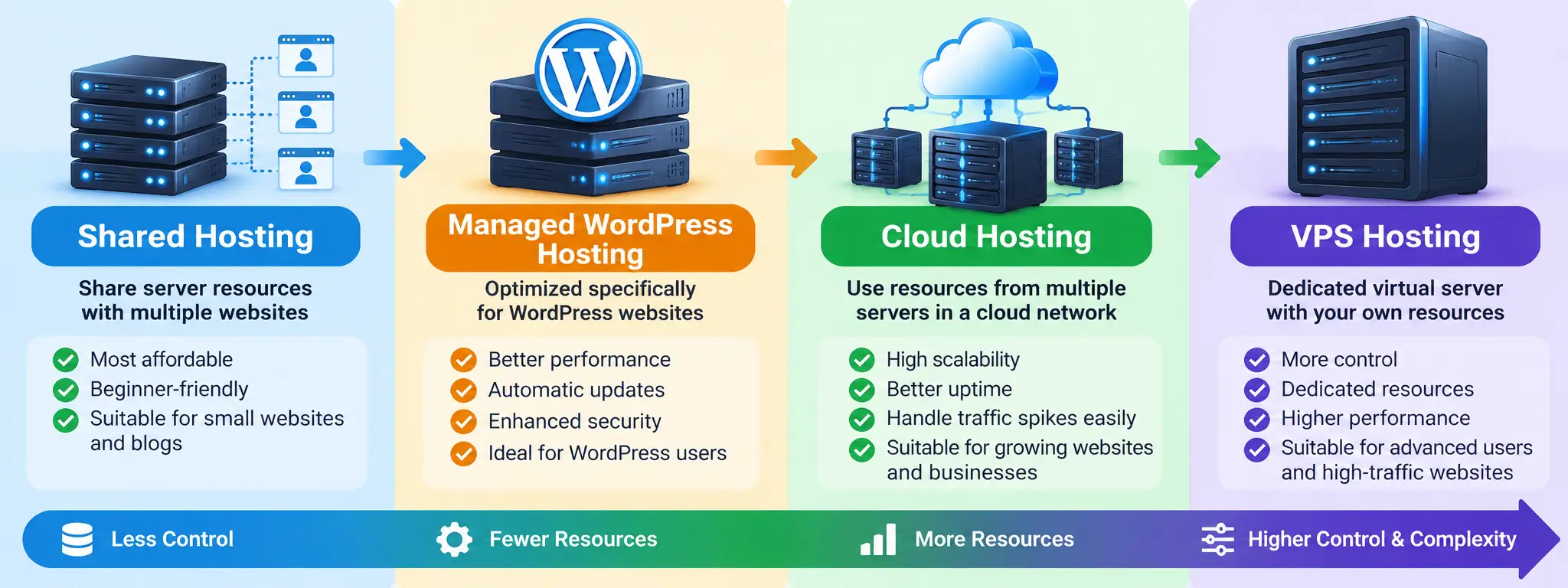
The four major types of web hosting plans
1. Shared hosting
Shared hosting places multiple websites on the same underlying server infrastructure.
It is generally designed for:
- Blogs
- Personal websites
- Small business websites
- New WordPress sites
- Low-to-moderate traffic websites
- Simple informational websites
Its main attraction is cost.
The trade-off is that you have less control and fewer dedicated resources than you would typically have with a VPS or dedicated environment.
For a new website, shared hosting can be perfectly adequate.
2. Managed WordPress hosting
Managed WordPress hosting is specifically designed around WordPress.
Depending on the provider, it may include:
- WordPress installation
- Automatic updates
- Backups
- Caching
- Security monitoring
- Staging
- WordPress-specific optimization
- Migration tools
For example, GoDaddy’s current managed WordPress plans include features such as automated malware scanning, backups, staging on higher tiers and WordPress-specific management tools.
This type of hosting can be useful if you want to spend more time publishing content and less time managing the underlying WordPress environment.
3. Cloud hosting
Cloud hosting provides more resources and scalability than conventional entry-level shared hosting.
It becomes particularly relevant when a website:
- Receives substantially more traffic
- Has traffic spikes
- Runs an online store
- Uses heavier applications
- Needs more CPU or RAM
- Has outgrown its existing shared plan
Hostinger currently describes its managed cloud hosting as providing more resources and scalability than traditional shared hosting, with its Cloud Startup plan offering 4 CPU cores, 4 GB RAM and 100 GB NVMe storage at its displayed promotional rate.
The important distinction is that cloud hosting is not simply “shared hosting with a bigger storage number.” The underlying resource model and scalability can be different.
4. VPS hosting
A Virtual Private Server provides a more isolated environment and substantially greater control.
VPS hosting is generally aimed at users who need:
- More control over the server
- Custom software configurations
- Specific server resources
- Greater flexibility
- Application hosting
- Developer-oriented environments
The trade-off is complexity.
If you are running a straightforward WordPress blog and do not know how to administer a server, paying for a VPS may create more work rather than solving a problem.
Web hosting plans in India: current pricing examples
The following figures are current advertised prices checked on September 27, 2026. Hosting companies frequently change promotions, so these should be treated as a snapshot rather than permanent prices.
| Provider | Example plan | Advertised rate | Renewal rate shown | Websites | Storage |
|---|---|---|---|---|---|
| Hostinger | Premium | ₹149/mo | ₹449/mo | 3 | 20 GB SSD |
| Hostinger | Unlimited | ₹249/mo | ₹649/mo | Unlimited | 50 GB NVMe |
| Hostinger | Cloud Startup | ₹599/mo | ₹1,599/mo | Unlimited | 100 GB NVMe |
| BigRock | Standard | ₹69/mo | ₹409/mo | 1 | 20 GB NVMe |
| BigRock | Business | ₹159/mo | ₹649/mo | 5 | 25 GB NVMe |
| Bluehost | Starter | ₹199/mo | ₹349/mo | 10 | 10 GB NVMe |
| Bluehost | Business | ₹279/mo | ₹529/mo | 50 | 50 GB NVMe |
| GoDaddy | Starter | ₹89/mo* | — | 1 | 10 GB NVMe |
| GoDaddy | Economy | ₹219/mo* | — | 1 | 25 GB NVMe |
*GoDaddy’s displayed rates depend on the selected term; its current page shows ₹89/month for the Starter plan on a three-year term and ₹219/month for Economy on that same promotional structure.
Hostinger explicitly states that its displayed monthly rate is derived from the total upfront cost of the selected term, while BigRock and Bluehost display renewal pricing alongside their promotional prices.
That distinction is one of the most important things to understand before purchasing hosting.
Promotional price vs renewal price: the calculation many buyers miss
Suppose a provider advertises:
₹149/month
That does not necessarily mean you can continue hosting the website indefinitely for ₹149 every month.
Hostinger currently displays its Premium plan at ₹149/month for a 48-month term, with ₹7,152 paid upfront and a listed renewal rate of ₹449/month.
BigRock’s current Standard plan is displayed at ₹69/month but renews at ₹409/month.
Bluehost currently lists its Starter plan at ₹199/month for a 36-month term and ₹349/month renewal.
This produces an important buying rule:
Never compare hosting plans using the promotional monthly price alone.
Instead, calculate:
First-term cost + renewal cost + taxes + required add-ons
For a website you intend to operate for several years, the renewal price may matter more than the introductory discount.
What should you actually compare?
Price is only one variable.
Before buying a hosting plan, compare these factors.
1. Number of websites
If you only have one website, a plan supporting 50 or unlimited websites may provide resources you never use.
On the other hand, if you operate multiple sites, upgrading to a multi-site plan can be more economical than purchasing separate accounts.
For example, current plans from Hostinger, BigRock and Bluehost differ substantially in their website limits.
2. Storage
Storage determines how much website data you can keep.
But bigger is not automatically better.
A text-heavy blog may require relatively little storage, while a photography site, video platform or large e-commerce catalogue can require much more.
Also check whether the advertised storage is:
- SSD
- NVMe
- Shared
- Dedicated
- Subject to fair-use rules
Hostinger, BigRock and Bluehost currently advertise SSD/NVMe-based storage across their plans, but the amount varies considerably by tier.
3. CPU and RAM
This is one area beginners often overlook.
A website can have plenty of storage and still perform poorly if the hosting environment cannot provide sufficient processing capacity for its workload.
CPU and RAM become increasingly important when you run:
- WooCommerce
- Large databases
- Membership systems
- Heavy plugins
- Custom applications
- High-traffic websites
- Resource-intensive scripts
For ordinary blogs, the basic plan may be sufficient initially.
4. Backups
Backups are not the same as storage.
A hosting company can give you 50 GB of storage without providing the backup strategy you actually need.
Check:
- How frequently backups occur
- How long they are retained
- Whether restoration is included
- Whether backups are automatic
- Whether on-demand backups are available
- Whether backups are stored separately
Current provider offerings vary. Hostinger lists weekly backups on several entry plans and daily backups on higher tiers, while BigRock advertises daily backups on its current Linux hosting plans.
For an important business or publishing website, maintaining an independent backup is still sensible.
5. SSL and HTTPS
HTTPS protects the connection between a website and its visitors.
WordPress.org currently recommends HTTPS support as part of the hosting environment for WordPress. It also recommends PHP 8.3 or greater and either MariaDB 10.11+ or MySQL 8.0+ for current WordPress installations.
Most mainstream hosting providers now include SSL certificates with their plans.
That means SSL should not normally be the deciding factor between otherwise comparable hosting packages.
6. WordPress compatibility
If your website runs WordPress, check the technical environment rather than simply looking for a “WordPress hosting” label.
WordPress.org currently recommends:
- PHP 8.3 or newer
- MariaDB 10.11 or newer, or MySQL 8.0 or newer
- HTTPS
- Apache or Nginx are recommended server options
A provider does not necessarily need to sell a product called “Managed WordPress” for WordPress itself to work.
That distinction can prevent unnecessary spending.
7. CDN and caching
A CDN can help deliver static website resources from locations closer to visitors.
Caching can also reduce the amount of work required from the origin server.
These technologies can improve performance, but hosting alone does not guarantee a fast website.
Google recommends that site owners pay attention to real-world Core Web Vitals, including loading performance, responsiveness and visual stability.
In other words:
Good hosting is one component of performance—not the entire performance strategy.
Your theme, plugins, images, JavaScript, database, caching configuration and content architecture also matter.
8. Customer support
Support becomes especially important for beginners.
Before purchasing, check:
- Is support available 24/7?
- Is it live chat or ticket-based?
- Is phone support available?
- Does the provider assist with migration?
- Can support troubleshoot WordPress problems?
- Is technical support included or charged separately?
Current plans differ here. For example, Bluehost’s Starter plan currently lists 24/7 chat support but no phone support, while its Business plan includes phone support.
9. Control panel
The control panel determines how easily you can manage the account.
Common options include:
- cPanel
- Custom hosting panels
- Plesk
- Provider-specific dashboards
BigRock’s current shared hosting plans, for example, list cPanel, while its older hosting documentation also shows support for Plesk in relevant environments.
For beginners, ease of use may be more valuable than having dozens of advanced controls.
Shared hosting vs cloud hosting vs VPS
The easiest way to understand the difference is to think about control, resources and complexity.
| Factor | Shared | Cloud | VPS |
|---|---|---|---|
| Cost | Usually lowest | Medium | Higher |
| Beginner-friendly | High | High–medium | Lower |
| Server control | Limited | Medium | High |
| Scalability | Limited–medium | High | High |
| Maintenance | Provider-managed | Often managed | Can require technical administration |
| Suitable for blog | Yes | Yes | Usually unnecessary |
| Suitable for growing site | Sometimes | Yes | Yes |
| Custom applications | Limited | Good | Very good |
| Technical knowledge | Low | Low–medium | Medium–high |
The right choice depends on workload rather than the prestige of the hosting category.
When should you upgrade from shared hosting?
Don’t upgrade simply because your website has existed for a certain number of months.
Upgrade when there is an identifiable reason.
Examples include:
Your website is consistently hitting resource limits
If your host repeatedly reports CPU, RAM, entry-process or similar resource limitations, investigate the cause.
Sometimes the problem is an inefficient plugin or poorly optimized application rather than insufficient hosting.
Traffic has increased significantly
A website experiencing substantial traffic growth may eventually require more resources.
You operate an online store
E-commerce sites can require more processing capacity because of databases, product queries, user sessions, payment systems and other dynamic operations.
You need server-level control
This is a more obvious VPS use case.
If your application requires specific software or server configuration unavailable on shared hosting, a VPS may become necessary.
You are experiencing genuine performance problems
First diagnose the problem.
Don’t automatically assume:
Slow website = buy expensive hosting.
Performance problems can come from oversized images, inefficient plugins, poor caching, third-party scripts, database issues or a badly configured website.
How much hosting do you need for a WordPress website?
For a typical new WordPress website, focus on these fundamentals:
- Reliable hosting
- Current PHP support
- MySQL/MariaDB compatibility
- HTTPS
- Automatic backups
- Adequate storage
- Easy WordPress installation
- Good support
- Simple migration
- Upgrade options
You probably do not need:
- A dedicated server
- Dozens of CPU cores
- Hundreds of gigabytes of storage
- Unlimited everything
- Enterprise infrastructure
unless your actual workload justifies it.
WordPress itself has relatively straightforward baseline hosting requirements.
What does “unlimited” actually mean?
This is another area where buyers should read the terms.
A plan labelled “unlimited websites,” “unlimited bandwidth” or similar does not necessarily mean infinite server resources.
For example, Bluehost explicitly explains that resources advertised as unmetered are not literally infinite and remain subject to its Terms of Service and Acceptable Use Policy.
Hostinger similarly states that unlimited features are subject to its Fair Usage Policy.
Therefore, treat “unlimited” as a commercial plan description, not as unlimited CPU, RAM or server capacity.
A better way to compare hosting plans
Instead of asking:
“Which hosting plan is cheapest?”
Ask these seven questions:
- What will the first term actually cost me?
- What will renewal cost?
- How many websites will I host?
- How much CPU/RAM or equivalent resource capacity is available?
- What backup system is included?
- Can I upgrade without migrating to another provider?
- Does the plan support the software I actually intend to run?
This produces a much more useful comparison.
Web hosting buying checklist for Indian users
Before clicking Buy, check:
Pricing
- Promotional price
- Full upfront payment
- Contract duration
- Renewal price
- GST/taxes
- Domain renewal cost
- Email renewal cost
- Backup/security add-ons
Technical specifications
- Storage
- CPU
- RAM
- Website limits
- Database limits
- Inodes/file limits
- PHP versions
- MySQL/MariaDB versions
- SSL
- CDN
- Caching
Reliability
- Backup frequency
- Restore process
- Uptime policy
- Data-center options
- Support availability
- Migration assistance
Future growth
- Easy plan upgrades
- Cloud/VPS availability
- Server resource monitoring
- Staging environment
- SSH/SFTP if needed
What should beginners look for?
If you’re launching your first WordPress blog, don’t overcomplicate the decision.
A sensible starting configuration is:
Shared or managed WordPress hosting + SSD/NVMe storage + SSL + backups + straightforward WordPress installation + reliable support.
Once your website demonstrates a genuine need for additional resources, move upward.
This approach also leaves room to learn how your website actually behaves before committing to expensive infrastructure.
What should a small business choose?
A small business website may benefit from a slightly higher-tier shared or managed WordPress plan if it needs:
- Multiple websites
- Business email
- More storage
- Daily backups
- Staging
- Better security
- More resources
- Easier management
The business should also consider the cost of downtime.
If a website generates leads or sales, saving a few hundred rupees a month may be less important than having dependable recovery and support.
What should a high-traffic website choose?
There is no universal traffic number at which every website must move to cloud or VPS hosting.
Two sites with the same number of visitors can have completely different resource requirements.
A mostly static content website and a dynamic e-commerce application can behave very differently.
Look at:
- CPU usage
- RAM usage
- database load
- PHP workers
- concurrent users
- cache hit rates
- response times
- traffic spikes
- server errors
Then decide whether the existing hosting environment is actually the bottleneck.
Does hosting affect SEO?
Hosting can indirectly affect search performance through website performance and availability, but hosting is not an SEO shortcut.
Google’s documentation recommends good Core Web Vitals and overall page experience, including loading performance, responsiveness, visual stability, mobile usability and secure delivery.
That means a technically sound hosting environment can contribute to a better user experience.
But buying a more expensive hosting plan does not automatically make content rank higher.
A fast server cannot compensate for:
- Poor content
- Weak search intent
- Bad information architecture
- Unhelpful pages
- Poor mobile experience
- Slow themes/plugins
- Weak internal linking
The most important lesson: compare the total cost of ownership
The cheapest-looking hosting plan may not be the cheapest hosting solution over several years.
Consider this simplified example:
Plan A
- Low introductory price
- High renewal price
- One website
- Limited backups
Plan B
- Slightly higher introductory price
- Lower renewal increase
- Several websites
- Daily backups
If you operate three websites, Plan B could potentially have a lower effective cost despite its higher advertised starting price.
This is why hosting comparisons should use total cost and actual requirements, not promotional price alone.
Frequently misunderstood facts
“Unlimited storage means I can store anything.”
No. “Unlimited” plans still have terms, fair-use policies and technical constraints. Bluehost and Hostinger explicitly describe limitations around their unmetered/unlimited offerings.
“The cheapest hosting is always suitable for a new blog.”
Not necessarily. The cheapest plan may have a one-site limit, less storage, fewer backups or a higher renewal price.
“VPS is always faster.”
Not automatically. Performance depends on the server configuration, resources, software stack and workload.
“More storage means faster hosting.”
No. Storage capacity and processing performance are different things.
“Managed WordPress hosting is required for WordPress.”
No. WordPress can run on compatible conventional hosting. WordPress.org lists its technical requirements independently of whether the provider markets a product specifically as managed WordPress hosting.
“Hosting alone determines website speed.”
No. Hosting is only one part of the performance equation.
What we know and what can change
Confirmed: The providers examined currently advertise different introductory and renewal prices, website limits, storage capacities, backup policies and hosting features.
Important limitation: Hosting prices are promotional and can change without notice.
Also variable: Taxes, domains, email, renewal charges, promotional eligibility and checkout totals can depend on the provider, subscription duration and selected products.
Practical conclusion: Always verify the final checkout price and renewal terms before paying.
Conclusion
Choosing web hosting plans is less about finding the smallest number on a pricing page and more about matching infrastructure to the website you actually intend to operate.
For a new blog or small WordPress website, shared or managed WordPress hosting can provide the necessary foundation without unnecessary complexity. As traffic, application requirements or resource consumption increase, cloud hosting or a VPS can become more appropriate.
The most important comparison is therefore not:
₹69 vs ₹149 vs ₹199.
It is:
What am I paying now → what will I pay later → what resources do I receive → what limitations apply → and can the hosting grow with my website?
That approach makes a hosting purchase much easier to evaluate—and reduces the chance of choosing a plan simply because its introductory price looks attractive.
FAQ
Which web hosting plan is best for a beginner?
A basic shared or managed WordPress plan is usually sufficient for a new blog, portfolio or small business website. The important criteria are compatibility, backups, support, security and a straightforward upgrade path rather than maximum server capacity.
How much does web hosting cost in India?
Current advertised introductory prices range from under ₹100/month to several hundred rupees per month for mainstream shared plans, while cloud and advanced hosting can cost substantially more. The renewal price can be significantly higher than the promotional price.
Is cheap web hosting safe?
Low price alone does not determine security. Check whether the provider includes SSL, backups, malware protection, account isolation, security monitoring and reliable support.
What is the difference between shared hosting and VPS?
Shared hosting is designed for multiple websites using shared infrastructure and is generally simpler for beginners. VPS hosting provides greater control and isolation but can require considerably more technical knowledge.
Do I need cloud hosting for WordPress?
Not necessarily. A new or modest WordPress website can often operate on shared hosting. Cloud hosting becomes more relevant when the site needs additional resources, scalability or more consistent performance.
Should I buy hosting for one year or several years?
A longer term can reduce the introductory monthly equivalent, but you should compare the total upfront payment and future renewal price before committing. Current providers use different promotional periods and renewal structures.
Does hosting improve Google rankings?
Hosting can contribute to website performance and reliability, but it does not guarantee rankings. Google recommends good page experience and Core Web Vitals, but search visibility depends on many other factors.
Can I change hosting providers later?
Yes. Websites can generally be migrated between hosting providers. The difficulty depends on the website’s software, database, email configuration, DNS setup and the migration tools provided by the hosts.
Disclaimer
Hosting prices, promotional offers, renewal rates, features and availability can change. The prices in this article are a September 27, 2026 snapshot based on the providers’ publicly displayed information at the time of research. Readers should verify the final price, applicable taxes, renewal terms and included features on the provider’s website before purchasing.