If you are learning Google Ads for the first time, the terminology can be confusing. Search, Display, Shopping, Video, Demand Gen, App and Performance Max are all different campaign types, but they do not all work in the same way or appear in the same places.
There is another reason older guides can be confusing: Google has changed how several advertising products are organized. Discovery campaigns evolved into Demand Gen, Video Action campaigns have been upgraded to Demand Gen, and Google is now moving standalone Display campaigns toward a Demand Gen-based Google Display Network setup.
So, rather than simply listing every advertising product Google has ever offered, this guide explains the main Google Ads campaign types relevant in 2026, what each one does, where it can appear and when it makes sense.
Quick answer: What are the main types of Google Ads?
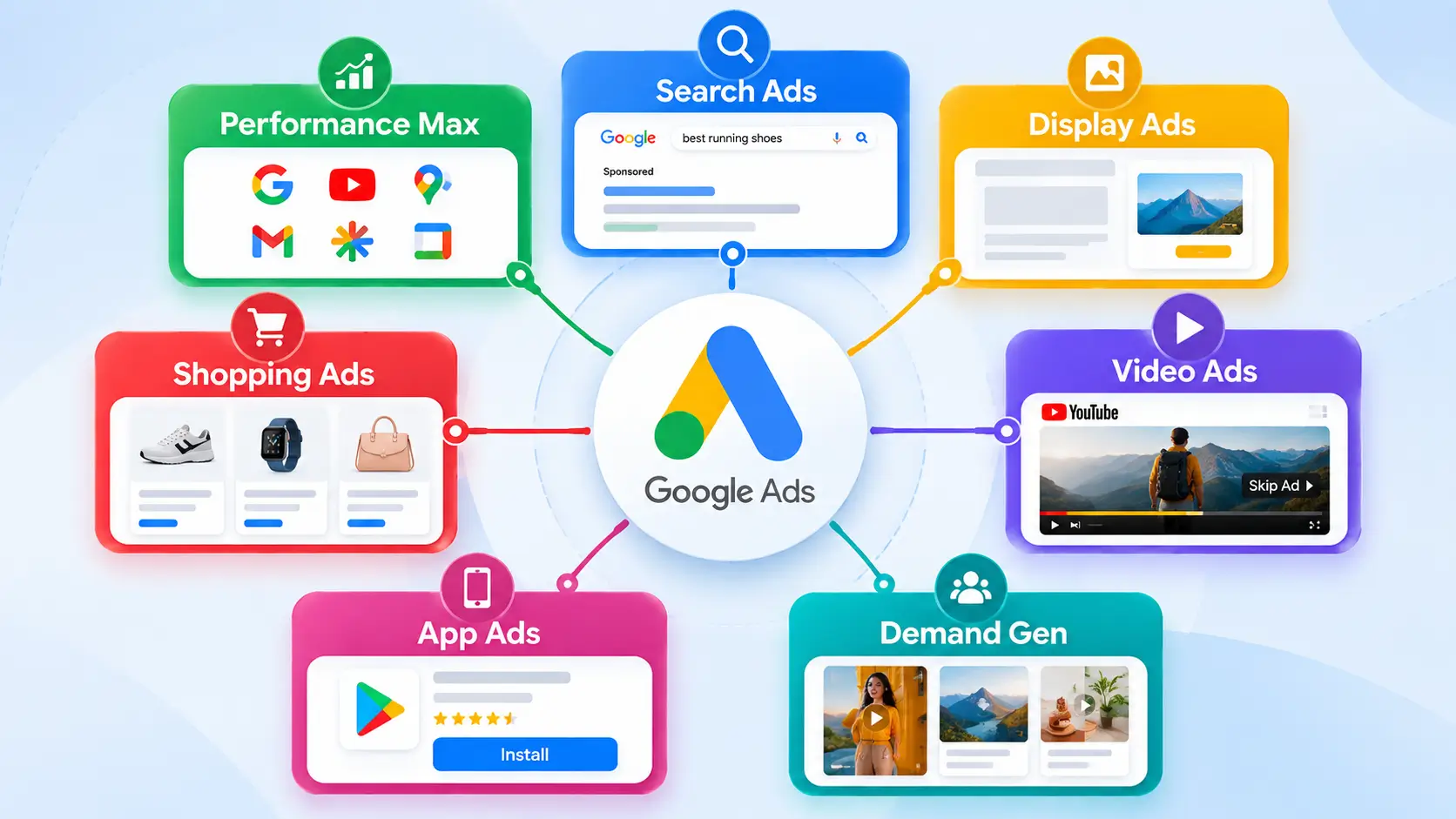
For most advertisers, the major Google Ads campaign types to understand are:
| Google Ads type | Main purpose | Typical environment |
|---|---|---|
| Search | Capture existing search demand | Google Search |
| Performance Max | Find conversions across Google’s inventory | Search, YouTube, Display, Discover, Gmail, Maps and other eligible inventory |
| Display | Visual advertising and audience reach | Websites, apps and Google Display Network inventory |
| Demand Gen | Create demand and drive action through visual content | YouTube, Shorts, Discover, Gmail and Google Display Network |
| Video | Reach viewers with video advertising | YouTube and eligible video partners |
| Shopping | Promote products with product information | Google Search, Shopping and other eligible placements |
| App | Promote mobile apps | Search, Google Play, YouTube, Discover, Display and other eligible inventory |
Google itself currently identifies these seven advertising solutions as campaign types.
The important point is that these are campaign categories, not seven individual ad designs.
For example, Performance Max can use several formats and placements from one campaign.
What is Google Ads?
Google Ads is Google’s advertising platform for businesses and organizations that want to promote products, services, websites, apps or other offerings across Google’s advertising ecosystem.
Where an advertisement appears depends on the campaign type, targeting, objectives, available inventory and other settings.
That means someone searching Google for “best running shoes” may encounter a Search or Shopping ad, while someone watching YouTube could encounter a video advertisement.
A person browsing a website could see a Display advertisement, while someone scrolling through Discover could encounter a Demand Gen campaign.
The campaign type therefore determines much more than the visual appearance of an advertisement.
1. Google Search Ads
Best suited for: People actively searching for a product, service or solution.
Search campaigns are the most straightforward Google Ads concept to understand.
A business selects relevant search themes or keywords and creates advertisements designed to appear when people search for related products or services.
For example:
A person searches for “AC repair service in Ludhiana.”
An AC repair company could use a Search campaign to reach people who are actively looking for that service.
Why Search Ads are different
Search advertising primarily captures existing demand.
The person has already expressed an intention through a search query.
This makes Search particularly relevant for:
- Service businesses
- Local businesses
- Lead generation
- Professional services
- B2B companies
- High-intent product searches
- Websites selling specific products or services
Google describes Search campaigns as a way to reach people while they are actively searching for the products or services a business offers.
Example
A digital marketing agency might target searches related to:
- digital marketing agency
- SEO services
- Google Ads agency
- PPC agency in India
The advertisement then attempts to turn that existing search intent into a visit, enquiry or conversion.
Important limitation
Search Ads do not automatically create demand.
If nobody is searching for your product category, simply creating a Search campaign does not solve that problem.
2. Performance Max
Best suited for: Advertisers who want Google AI to optimize campaigns across multiple Google channels toward defined conversion goals.
Performance Max, commonly called PMax, is fundamentally different from a traditional single-channel campaign.
Google describes it as a goal-based campaign type that can access Google’s advertising inventory from one campaign.
Depending on eligibility and settings, Performance Max can reach inventory across areas such as:
- Google Search
- YouTube
- Display
- Discover
- Gmail
- Maps
- Shopping-related inventory
It can also use different creative and product formats.
What makes Performance Max unusual?
A traditional Search campaign is primarily associated with Search.
Performance Max is designed to work across multiple Google surfaces.
Google’s systems use signals relating to users, context, creative assets and conversion goals to determine where and when advertisements should be shown.
Example
Imagine an online furniture store wants to increase purchases.
Instead of manually creating separate campaigns for every Google surface, the business could provide:
- Product information
- Images
- Videos
- Text assets
- Audience information
- Conversion data
- Budget
- Business goals
Performance Max can then use those inputs across eligible Google inventory.
Performance Max is not simply “one ad”
This is an important distinction.
Performance Max is a campaign type, while the campaign can deliver multiple types of advertising experiences.
When it can make sense
Performance Max can be relevant for:
- Ecommerce
- Lead generation
- Online sales
- Businesses with meaningful conversion data
- Retailers using Merchant Center
- Advertisers seeking cross-channel reach
However, automation does not eliminate the need for good conversion tracking, useful creative assets, accurate product information and sensible campaign structure.
3. Google Display Ads
Best suited for: Visual advertising and reaching audiences while they browse websites and apps.
Display advertising is different from Search advertising because the user does not necessarily have to be searching for the advertiser’s product at that moment.
Display advertising can use visual creative such as images and responsive assets to reach audiences across eligible websites, apps and Google properties.
Example
Suppose someone previously visited an online electronics store but did not purchase anything.
A business may use audience-based advertising to reconnect with that person when eligible Display inventory is available.
Display can therefore be useful for:
- Brand awareness
- Audience reach
- Remarketing or first-party audience strategies
- Product awareness
- Visual promotions
- Supporting a broader advertising funnel
An important 2026 change
This is where older Google Ads articles can become misleading.
Google is moving Google Display Ads campaigns toward Demand Gen with Google Display Network inventory.
The migration began rolling out in 2026, and Google says new standalone Display campaign creation will eventually move into Demand Gen, while existing eligible Display campaigns can continue to be accessed and edited until migration.
Therefore, readers should not assume that the Display campaign workflow described in a 2022 or 2023 article will look identical in 2026.
The underlying Display Network inventory is not simply disappearing; Google is changing how advertisers access and manage it.
4. Google Demand Gen
Best suited for: Creating demand and engaging people through visually rich advertising before or during the consideration stage.
Demand Gen is one of the most important newer concepts in Google’s advertising system.
Google describes Demand Gen as a campaign type designed to capture engagement and action across visual surfaces including:
- YouTube
- YouTube Shorts
- Discover
- Gmail
- Google Display Network
- Eligible Maps inventory in certain configurations
It can use both image and video creative.
Search vs Demand Gen
This difference is worth understanding.
Someone searches:
“Best smartphone under ₹30,000”
That person has already expressed demand.
A Search campaign can respond to that intent.
But another person may be watching smartphone content on YouTube or browsing Discover without actively searching for a particular phone.
Demand Gen can be used to introduce products and create interest in those environments.
Demand Gen can therefore be useful for:
- Brand discovery
- Product consideration
- Visual storytelling
- New customer acquisition
- Ecommerce promotion
- YouTube and Shorts campaigns
- Audience-based advertising
Demand Gen is also replacing older concepts
Google has been consolidating several campaign products into Demand Gen.
Video Action Campaigns, for example, were upgraded to Demand Gen during 2026.
This is one reason a current guide should not simply copy lists from older Google Ads tutorials.
5. Google Video Ads
Best suited for: Reaching people through video content, especially on YouTube.
Video campaigns are designed around video advertising rather than conventional text-based Search advertising.
Depending on the campaign and objective, video advertising can support goals such as:
- Reach
- Views
- Engagement
- Consideration
- Sales
- Leads
Video formats can include experiences such as:
- Skippable in-stream ads
- Non-skippable in-stream ads
- Bumper ads
- In-feed video ads
- Shorts advertising
- Other YouTube video experiences
Example
A smartphone manufacturer launching a new phone could create a short demonstration video showing:
- Camera features
- Battery capabilities
- Design
- Gaming performance
- AI features
The advertiser can then use an appropriate Video campaign to reach relevant YouTube audiences.
Video vs Demand Gen
These two can look similar because both can use video.
The distinction is primarily about the campaign strategy and surfaces, not simply whether the creative contains video.
Demand Gen is designed around visual discovery and demand creation across several Google surfaces.
Video campaigns are specifically structured around video advertising and YouTube-focused objectives and formats.
6. Google Shopping Ads
Best suited for: Ecommerce businesses and retailers selling physical products.
Shopping Ads are designed to show product information directly in advertising experiences.
A Shopping advertisement can include information such as:
- Product image
- Product title
- Price
- Store name
- Other product information
This allows shoppers to see important information before clicking.
How Shopping works
Shopping advertising relies heavily on product information supplied through Google Merchant Center.
Instead of building a conventional Search campaign around individual keywords, the advertiser supplies structured product information.
Google can then match relevant products to shopping-related searches and eligible placements.
Example
Suppose an Indian ecommerce store sells headphones.
Its Merchant Center product data could contain:
- Product name
- Brand
- Price
- Image
- Availability
- Product identifiers
- Landing page
A Shopping advertisement could then present the product to someone searching for a relevant item.
Shopping vs Performance Max
This is an important distinction.
A Shopping campaign focuses on shopping inventory.
Performance Max can use a Merchant Center product feed while also accessing broader Google inventory.
So:
Shopping = more focused product advertising
Performance Max + Merchant Center = product advertising combined with broader cross-channel automation
Neither should be treated as simply another name for the other.
7. Google App Campaigns
Best suited for: Businesses whose primary objective is promoting a mobile application.
App campaigns are designed to promote apps across multiple Google properties.
Depending on the campaign and eligibility, Google can distribute app advertising across environments including:
- Google Search
- Google Play
- YouTube
- Discover
- Google Display Network
- Other eligible app and web inventory
Google’s App campaigns can use information from the app and supplied creative assets to automatically create and distribute advertising experiences.
Common App campaign objectives
Google currently documents campaign subtypes including:
- App installs
- App engagement
- App pre-registration
Example
Imagine an Indian food-delivery startup launches an Android application.
Its goal may initially be:
Get new users to install the app.
Later, the objective may change to:
Encourage existing users to place another order.
These are different advertising goals even though both involve the same app.
Google Ads campaign types vs ad formats
This distinction is one of the most important things beginners should understand.
A campaign type determines the overall advertising framework.
An ad format describes how the advertisement can appear.
For example:
| Campaign type | Possible advertising experience |
|---|---|
| Search | Search text-based ads |
| Display | Image/responsive visual ads |
| Video | In-stream, Shorts and other video formats |
| Shopping | Product listings |
| App | Automatically assembled app promotion ads |
| Demand Gen | Image, video and multi-format visual experiences |
| Performance Max | Multiple formats across multiple Google surfaces |
That is why saying “there are seven Google Ads formats” is technically less precise than saying there are seven major Google Ads campaign types.
Which Google Ads type should you choose?
There is no universal campaign type that fits every business.
The correct starting point depends on what the business is actually trying to accomplish.
| Your primary objective | Campaign type to investigate |
|---|---|
| Capture people actively searching | Search |
| Sell products online | Shopping / Performance Max |
| Reach customers across Google channels | Performance Max |
| Build visual demand | Demand Gen |
| Reach YouTube viewers | Video |
| Promote an app | App |
| Reach people while they browse websites | Display / Demand Gen |
| Promote local inventory | Shopping / Performance Max with relevant local features |
This is not a ranking. It is a matching exercise between the business objective and the campaign’s design.
Search vs Display vs Demand Gen vs Performance Max
These four are often confused, so the simplest way to understand them is through user intent.
| Campaign | Typical user situation | Core idea |
|---|---|---|
| Search | User is actively searching | Capture existing demand |
| Display | User is browsing | Reach users visually |
| Demand Gen | User is discovering content | Create interest and consideration |
| Performance Max | User may interact across multiple Google surfaces | Optimize across Google’s inventory toward goals |
The boundaries are not absolute.
Modern Google Ads increasingly uses automation and multiple signals, so an advertiser should not think of the customer journey as four completely isolated boxes.
What happened to Discovery Ads?
If you have read older Google Ads guides, you may have seen Discovery campaigns.
Google’s advertising system has evolved since then.
Demand Gen became the newer framework for visual discovery-oriented campaigns.
Therefore, if a 2022 article tells you to create a new Discovery campaign, its instructions may no longer match the current Google Ads interface.
The same principle applies to other older campaign names.
What happened to Video Action Campaigns?
Video Action Campaigns are another example of Google’s consolidation.
Google removed the option to create new Video Action Campaigns in 2025 and subsequently upgraded existing campaigns to Demand Gen, with the final migration phase occurring in 2026.
For someone learning Google Ads today, Demand Gen is therefore the more relevant concept to understand instead of treating Video Action Campaigns as a current standalone choice.
What happened to Smart Shopping and Local campaigns?
Google previously offered Smart Shopping and Local campaigns as distinct campaign products.
Google began upgrading Smart Shopping and Local campaigns to Performance Max in 2022.
That means old articles listing Smart Shopping as one of today’s primary campaign choices can give beginners an outdated picture of the platform.
The broader lesson is important:
Google Ads campaign terminology changes over time.
A guide published several years ago can still explain useful advertising principles while having an outdated campaign menu.
What about Local Services Ads?
Local Services Ads deserve separate attention because they are not simply another ordinary Search campaign.
Google is also moving Local Services advertising into a more integrated Google Ads experience through specialized Performance Max campaigns with pay-per-lead goals.
The transition is being rolled out in phases, and the timing differs by market and business category.
For Indian advertisers, availability and timing should therefore be checked in the actual Google Ads account rather than assumed from a U.S.-focused tutorial.
A simple Google Ads decision framework
Before creating a campaign, answer these five questions.
1. What are you selling?
A product, service, app, content subscription or something else?
2. Is the customer already searching for it?
If yes, Search may be relevant.
If demand needs to be created or developed, visual campaigns may play a larger role.
3. Is it an ecommerce product?
If yes, investigate Merchant Center, Shopping and Performance Max.
4. Do you have strong visual creative?
If your marketing depends on demonstrations, storytelling or product visuals, Video and Demand Gen may be important.
5. What conversion are you actually measuring?
Possible goals include:
- Purchase
- Lead
- Phone enquiry
- Signup
- App install
- App action
- Store-related action
- Website engagement
The campaign should be built around the business outcome rather than simply the desire to get clicks.
A practical example for an Indian business
Consider an imaginary Indian clothing company selling women’s ethnic wear online.
The company might use different Google Ads campaigns for different purposes.
Search
Capture searches such as:
buy cotton kurti online
Shopping
Show products with:
image + product name + price + store information
Performance Max
Use product feeds and creative assets to find conversions across eligible Google inventory.
Demand Gen
Show visually attractive product photography or short videos to people discovering fashion content.
Video
Create YouTube videos showing styling ideas, new collections or seasonal campaigns.
The company does not necessarily need every campaign.
The correct combination depends on its objectives, budget, conversion tracking, creative assets and existing demand.
Google Ads mistakes beginners should avoid
Mistake 1: Choosing a campaign because it sounds popular
A campaign should solve a business problem.
“Everyone is using Performance Max” is not a sufficient reason to use it.
Mistake 2: Confusing impressions with business results
A campaign can generate large numbers of impressions without producing meaningful sales or leads.
Mistake 3: Ignoring conversion tracking
If Google cannot reliably identify important conversions, automated campaigns have less useful information to optimize against.
Mistake 4: Treating Google Ads as one advertising channel
Google Ads now spans multiple surfaces and campaign systems.
Search, YouTube, Shopping, Display, Discover, Gmail, Maps and app environments can behave very differently.
Mistake 5: Following an outdated tutorial blindly
Check the publication date and compare the instructions with Google’s current documentation.
This matters particularly in 2026 because Google is consolidating several older campaign products.
The bigger change: Google Ads is becoming more automated
One of the biggest changes beginners should understand is the increasing role of automation.
Google now uses AI across areas such as:
- Bidding
- Audience signals
- Creative combinations
- Placement decisions
- Conversion optimization
- Product matching
- Campaign optimization
But automation does not mean advertisers can simply upload assets and forget about the campaign.
The quality of the inputs still matters.
That includes:
- Accurate conversion tracking
- Good landing pages
- Useful creative
- Correct product information
- Appropriate goals
- Sensible budgets
- Clear business objectives
Automation can optimize a campaign, but it cannot compensate indefinitely for a poorly defined business objective.
The easiest way to remember the seven types
Think of them like this:
Search → capture demand
Display → reach people visually while browsing
Video → reach viewers through video
Shopping → promote products
App → promote apps
Demand Gen → create and develop demand through visual experiences
Performance Max → optimize across multiple Google channels toward business goals
This mental model is more useful than memorizing a long list of individual ad formats.
Frequently Asked Questions
1. How many types of Google Ads are there in 2026?
Google currently identifies seven major advertising solutions or campaign types: Search, Performance Max, Display, Demand Gen, Shopping, Video and App. Google Ads terminology can change, so older lists may contain products that have since been consolidated or migrated.
2. Which Google Ads type is used for Google Search?
Search campaigns are designed to show advertisements to people searching for relevant products and services on Google.
3. What is Performance Max in Google Ads?
Performance Max is a goal-based campaign type that can access multiple areas of Google’s advertising inventory from a single campaign and uses Google’s automated systems to optimize toward defined goals.
4. What are Google Shopping Ads?
Shopping Ads are product-focused advertisements that can show information such as a product image, title, price and store name. They rely on product information supplied through Merchant Center.
5. What is Demand Gen in Google Ads?
Demand Gen is a visual campaign type designed to create engagement and action across surfaces such as YouTube, Shorts, Discover, Gmail and Google Display Network inventory.
6. Are Display Ads still available in 2026?
Google is transitioning standalone Display campaign functionality toward Demand Gen with Google Display Network inventory. Existing eligible Display campaigns can continue to be accessed during the transition, while Google says new standalone Display campaign creation will eventually move into Demand Gen.
7. Which Google Ads type is used for mobile apps?
App campaigns are specifically designed to promote applications, with objectives such as app installs, app engagement and eligible pre-registration campaigns.
8. Are Google Ads and Google AdSense the same?
No.
Google Ads is primarily an advertising platform used by advertisers to promote products, services, apps and businesses.
Google AdSense is a publisher monetization program through which eligible websites and other properties can display ads and potentially earn revenue.
They are related to Google’s advertising ecosystem but serve different purposes.
Conclusion
The most useful way to understand the types of Google Ads is not to memorize every advertising format Google has introduced over the years.
Start with the seven major campaign categories:
- Search
- Performance Max
- Display
- Demand Gen
- Video
- Shopping
- App
Then ask what you actually need to accomplish.
If customers are already searching for your service, Search may be relevant. If you sell products, Shopping and Performance Max can become important. If visual discovery is central to your strategy, Demand Gen and Video may matter. If the goal is app growth, App campaigns are designed for that purpose.
The terminology will continue to evolve. That is why understanding the purpose behind each campaign type is more valuable than memorizing an interface that Google may change later.
For advertisers in India, the safest approach is to combine that strategic understanding with Google’s current campaign documentation, because availability, features and migration timelines can differ by account, market and business category.