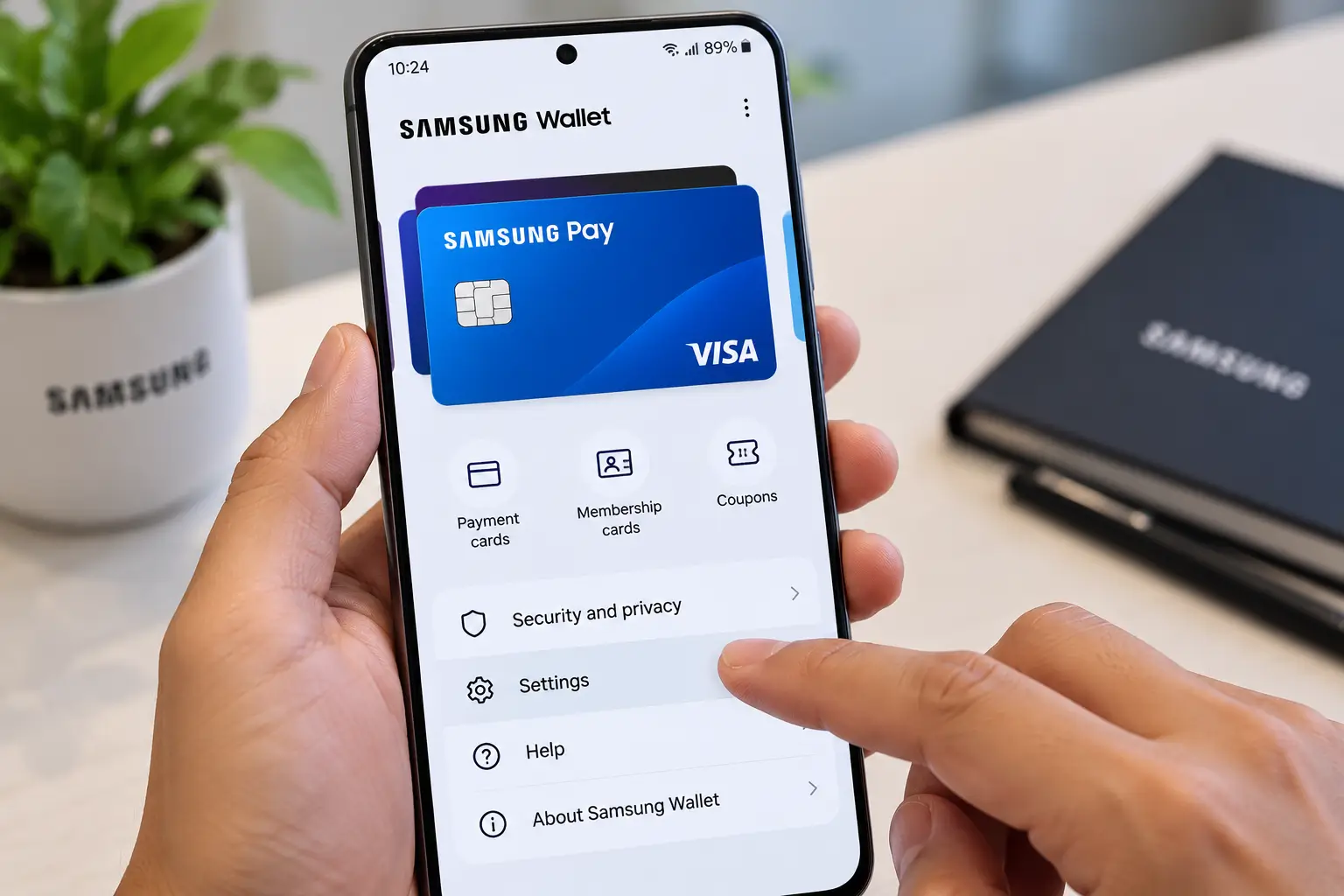
If you want to deactivate Samsung Pay on a Galaxy phone, the first thing to understand is that Samsung Pay is now integrated into Samsung Wallet. That means the option you need may be labelled Samsung Wallet rather than Samsung Pay on a newer device. Samsung’s current India documentation describes Samsung Wallet as the main app, with Samsung Pay functioning as its payment component.
But “deactivate Samsung Pay” can mean different things.
You may simply want to stop the wallet from opening when you swipe up from the bottom of the screen. You may want to remove a saved debit or credit card. Or you may want to remove or disable Samsung Wallet altogether.
The correct method depends on what you are trying to accomplish.
Quick answer
If Samsung Pay keeps opening when you swipe up, you usually do not need to uninstall it.
Open Samsung Wallet → Menu → Settings → Quick access and turn off the Quick Access options you do not want. Samsung’s support documentation confirms that Quick Access can be disabled when the wallet opens unintentionally.
If you want to remove a payment card, go to:
Samsung Wallet → All → Payment cards → Select card → More options → Delete card
Deleting the digital card from Samsung Wallet does not cancel your physical debit or credit card.
If you want to remove Samsung Wallet itself, the available option depends on your Galaxy model, software version, and whether the app is removable. Samsung says some pre-installed apps can be deleted or disabled, while others cannot.
What does “deactivate Samsung Pay” actually mean?
There are four different actions that users commonly describe as deactivating Samsung Pay.
| What you want to do | What you should do |
|---|---|
| Stop Samsung Pay/Wallet opening when you swipe up | Disable Quick Access |
| Stop using one debit/credit card | Delete the card from Samsung Wallet |
| Remove the app | Uninstall Samsung Wallet if your phone allows it |
| Stop an embedded app | Disable it if the Disable option is available |
| Phone lost or stolen | Remotely lock or erase wallet/payment information |
This distinction matters because removing a shortcut does not remove your payment cards, while removing a card does not necessarily uninstall Samsung Wallet.
1. How to turn off the Samsung Pay swipe-up shortcut
This is probably the solution you need if Samsung Pay keeps appearing accidentally.
Samsung Wallet can be opened through Quick Access from places such as the Home screen, Lock screen, or when the screen is off, depending on the settings enabled on your phone.
Steps
- Open Samsung Wallet.
- Tap the Menu icon.
- Open Settings.
- Tap Quick access.
- Turn off Quick Access for the locations where you do not want it.
Depending on your software version, you may see options related to Quick access and default card.
Once those shortcuts are disabled, swiping from the relevant part of the screen should no longer launch Samsung Wallet.
You do not need to remove your cards
This method only changes how Samsung Wallet is accessed.
Your payment cards can remain inside the wallet if you want to use Samsung Pay later.
Samsung specifically recommends disabling Quick Access when Samsung Wallet opens accidentally.
2. How to remove a debit or credit card from Samsung Pay
If your main concern is that your bank card is stored in Samsung Pay, you can remove the digital payment card without uninstalling Samsung Wallet.
Steps
- Open Samsung Wallet.
- Tap All.
- Select Payment cards.
- Tap the card you want to remove.
- Tap the three-dot More options button.
- Select Delete card.
- Confirm the deletion.
- Enter your Samsung Wallet PIN or use biometric authentication if requested.
Samsung’s current support instructions follow this process.
Does removing Samsung Pay delete the physical card?
No.
Removing a card from Samsung Wallet removes the digital payment information associated with the device. It does not close your bank account or cancel your physical debit or credit card.
Samsung explains that the physical card remains active after its digital equivalent is removed. If you actually want to cancel or suspend the physical card, you need to contact the card issuer.
This is one of the most important distinctions when deactivating Samsung Pay.
3. How to uninstall Samsung Wallet
If you no longer want Samsung Wallet on your phone, first check whether your Galaxy device allows the app to be uninstalled.
Try this method
- Open the Apps screen.
- Find Samsung Wallet.
- Touch and hold the app icon.
- Look for Uninstall.
- If the option is available, tap it.
- Confirm the removal.
Samsung’s current guidance says some pre-installed applications can be deleted, while others cannot. Availability depends on the app, device, and software version.
If you do not see Uninstall, that does not necessarily mean something is wrong with your phone.
The application may be treated as a pre-installed or embedded component.
4. What if there is no Uninstall option?
Do not assume that every Galaxy phone supports the same app-management controls.
Samsung states that the available options for pre-installed applications can vary. Some can be deleted, some can be disabled, and some can only be hidden.
If Samsung Wallet does not provide an uninstall option, check:
Settings → Apps → Samsung Wallet
If Disable is available, you can use that option.
Samsung’s current support documentation says some pre-installed apps can be disabled through:
Settings → Apps → Select the app → Disable
However, the Disable button is not available for every pre-installed application.
Why the exact steps vary
Samsung Galaxy phones use different One UI and Android versions, and menu names can change between models and software releases.
Samsung explicitly notes that available screens and settings may vary by device model and software version.
So an instruction written for an older Galaxy phone may not exactly match a newer Galaxy S, A, Z Fold or Z Flip device.
5. Samsung Pay vs Samsung Wallet: what changed?
The terminology can be confusing.
Samsung has integrated Samsung Pay into Samsung Wallet.
Samsung India’s current Wallet page describes Samsung Wallet as the umbrella platform that stores payment cards alongside other items such as tickets, identification documents, and digital keys. Samsung Pay is the payment functionality within that broader platform.
Samsung India also states that Samsung Pay is now part of Samsung Wallet, although some merchants may still display Samsung Pay as a payment option.
That means a search for “how to deactivate Samsung Pay” may lead you to settings labelled Samsung Wallet.
That is expected.
You do not necessarily have a separate Samsung Pay application to deactivate on a newer Galaxy device.
6. How to stop Samsung Wallet from opening accidentally
If your problem is not payments but the wallet appearing while you use gesture navigation, start with Quick Access.
Recommended sequence
Samsung Wallet → Menu → Settings → Quick access → Turn off unwanted shortcuts
Samsung documents this specifically as the way to stop Samsung Wallet from opening through its Quick Access shortcut.
This is generally a more targeted solution than removing the entire wallet.
Why this distinction matters
Suppose you occasionally use Samsung Wallet but dislike the swipe-up gesture.
Removing your cards or uninstalling the app would be unnecessary.
Turning off Quick Access addresses the actual problem while leaving the wallet available through its app icon.
7. How to remove Samsung Pay cards from multiple devices
If you use Samsung Wallet on more than one device, be careful when assuming that deleting a card everywhere happens automatically.
Samsung says that if Samsung Wallet or Samsung Pay is used on multiple devices, deleting a card from one device does not necessarily delete it from the other devices.
This can matter if you use Samsung Wallet on both:
- A Galaxy smartphone
- A Galaxy Watch
Samsung’s support documentation treats payment cards on the phone and watch separately. Cards may need to be removed from the watch as well.
For a Galaxy Watch, the exact process depends on the watch generation and the Galaxy Wearable software.
8. What if you lost your Samsung phone?
If the reason for deactivating Samsung Pay is that your phone has been lost or stolen, do not wait until you recover the device.
Samsung provides security tools for remotely locking Samsung Wallet/payment information.
According to Samsung India, you can use Samsung’s Find My Mobile service to lock the phone, which also locks Samsung Wallet. Samsung also describes an erase option for removing data from the device.
What to do
Use Samsung’s device-finding service and sign in to your Samsung account.
Select the missing device and use the available Lock option.
If the device cannot be recovered, Samsung provides an erase data option that can remove the device’s data, including Samsung Wallet information.
If you cannot secure the wallet remotely, Samsung advises contacting the card issuer immediately.
9. Should you turn off NFC to deactivate Samsung Pay?
Not necessarily.
NFC and Samsung Wallet are related, but they are not the same thing.
NFC is the short-range wireless technology used for contactless communication. Samsung says Galaxy devices can use NFC for Samsung Wallet payments as well as other functions such as transportation cards and data transfer.
Therefore, switching NFC off is not the same as deactivating Samsung Wallet.
If you turn NFC off
You may prevent NFC-based contactless payments from working, but you can also affect other NFC functions.
If your only problem is the Samsung Wallet swipe-up shortcut, disabling Quick Access is more directly relevant.
10. What happens to your bank card after you deactivate Samsung Pay?
This is an important security and banking question.
A Samsung Wallet payment card is a digital representation/token associated with the device.
Samsung says that when Samsung Pay is disabled or a registered card is removed, the digital token associated with the device is suspended. Your physical card remains usable unless you separately ask the card issuer to suspend or cancel it.
In practical terms:
Remove Samsung Wallet card → digital payment access is removed from the device.
Cancel physical bank card → contact your bank/card issuer.
These are different actions.
Samsung Pay deactivation: which method should you use?
| Your problem | Best action |
|---|---|
| Samsung Pay keeps appearing when you swipe | Turn off Quick Access |
| You don’t want a particular bank card in Samsung Wallet | Delete the card |
| You never use Samsung Wallet | Uninstall it if available |
| Wallet is pre-installed and cannot be uninstalled | Check whether Disable is available |
| You lost your phone | Remotely lock/erase the device and secure your cards |
| You want to stop NFC payments temporarily | Turn off NFC, understanding that other NFC functions may also stop |
| You want to cancel your actual bank card | Contact your bank/card issuer. |
Common mistakes when trying to deactivate Samsung Pay
Mistake 1: Removing the shortcut and assuming Samsung Pay is deleted
Turning off Quick Access only changes how the wallet opens. It does not necessarily remove the app or payment cards.
Mistake 2: Deleting Samsung Wallet when only one card needs to be removed
If you simply want to stop using one debit or credit card, deleting that card is more appropriate.
Mistake 3: Assuming the physical card has been cancelled
Removing a digital card from Samsung Wallet does not cancel the physical card.
Mistake 4: Following instructions for an older Galaxy phone
Samsung’s current software can have different menus from older Galaxy devices. Always check the settings available on your particular model.
Mistake 5: Turning off NFC without understanding the consequences
NFC supports functions beyond Samsung Wallet payments. Turning it off can affect other NFC-based features.
A simple decision tree
If you are unsure what to do, use this:
Does Samsung Pay keep opening when you swipe?
→ Yes → Disable Quick Access
Do you want to remove a saved debit/credit card?
→ Yes → Delete the card from Payment Cards
Do you want Samsung Wallet completely removed?
→ Check whether Uninstall is available.
No uninstall option?
→ Check Settings → Apps → Samsung Wallet for a Disable option.
Did you lose the phone?
→ Use Samsung’s device security tools to lock or erase the device and secure your payment information.
What is the safest way to deactivate Samsung Pay?
There is no single method that is right for everyone.
If you are simply annoyed by the swipe-up gesture, disable Quick Access.
If you no longer want a particular payment card stored digitally, remove that card.
If you never use Samsung Wallet and your Galaxy phone allows it, you can uninstall it.
If the phone is lost, prioritize remote security controls rather than waiting to access the device physically.
The key is to match the action to the problem instead of treating “deactivate Samsung Pay” as one universal setting.
FAQ
Can I completely deactivate Samsung Pay?
You can stop its Quick Access shortcuts, remove payment cards, and, on supported devices, uninstall or disable Samsung Wallet. The exact options depend on the Galaxy model and software version.
Is Samsung Pay the same as Samsung Wallet?
Samsung Pay has been integrated into Samsung Wallet. Samsung Wallet is the broader platform, while Samsung Pay refers to its payment functionality.
How do I stop Samsung Pay from opening when I swipe up?
Open Samsung Wallet, go to Menu → Settings → Quick access, and turn off the relevant Quick Access options.
Will deleting a Samsung Pay card cancel my debit or credit card?
No. Deleting the digital card from Samsung Wallet does not cancel the physical card. Contact your bank/card issuer if you want the physical card cancelled or suspended.
Can I uninstall Samsung Wallet?
It depends on the device. Samsung says some pre-installed apps can be deleted or disabled, while others cannot.
Why can’t I see the Disable button for Samsung Wallet?
The Disable option is not available for every pre-installed app. Samsung says app-management options vary by device and software version.
Does turning off NFC deactivate Samsung Pay?
Turning NFC off prevents NFC-based communication, including NFC payment functionality, but NFC also supports other features. It is not the same as removing or disabling Samsung Wallet.
What should I do if my phone with Samsung Pay is lost?
Use Samsung’s device security service to remotely lock the phone and Samsung Wallet. If necessary, Samsung also provides an erase option. If you cannot secure the wallet, contact your card issuer.
Conclusion
The easiest way to “deactivate Samsung Pay” depends on what you actually want to stop.
For an annoying swipe-up shortcut, turn off Samsung Wallet Quick Access. For a saved bank card, delete the card from Payment Cards. If you want the entire application gone, check whether your particular Galaxy phone allows Samsung Wallet to be uninstalled or disabled.
Most importantly, removing a digital card from Samsung Wallet is not the same as cancelling your physical bank card.
Because Samsung changes menu names and app behavior across Galaxy models and software versions, the exact settings on your phone may look slightly different. Check your device’s current Samsung Wallet settings if a menu described here is not present.