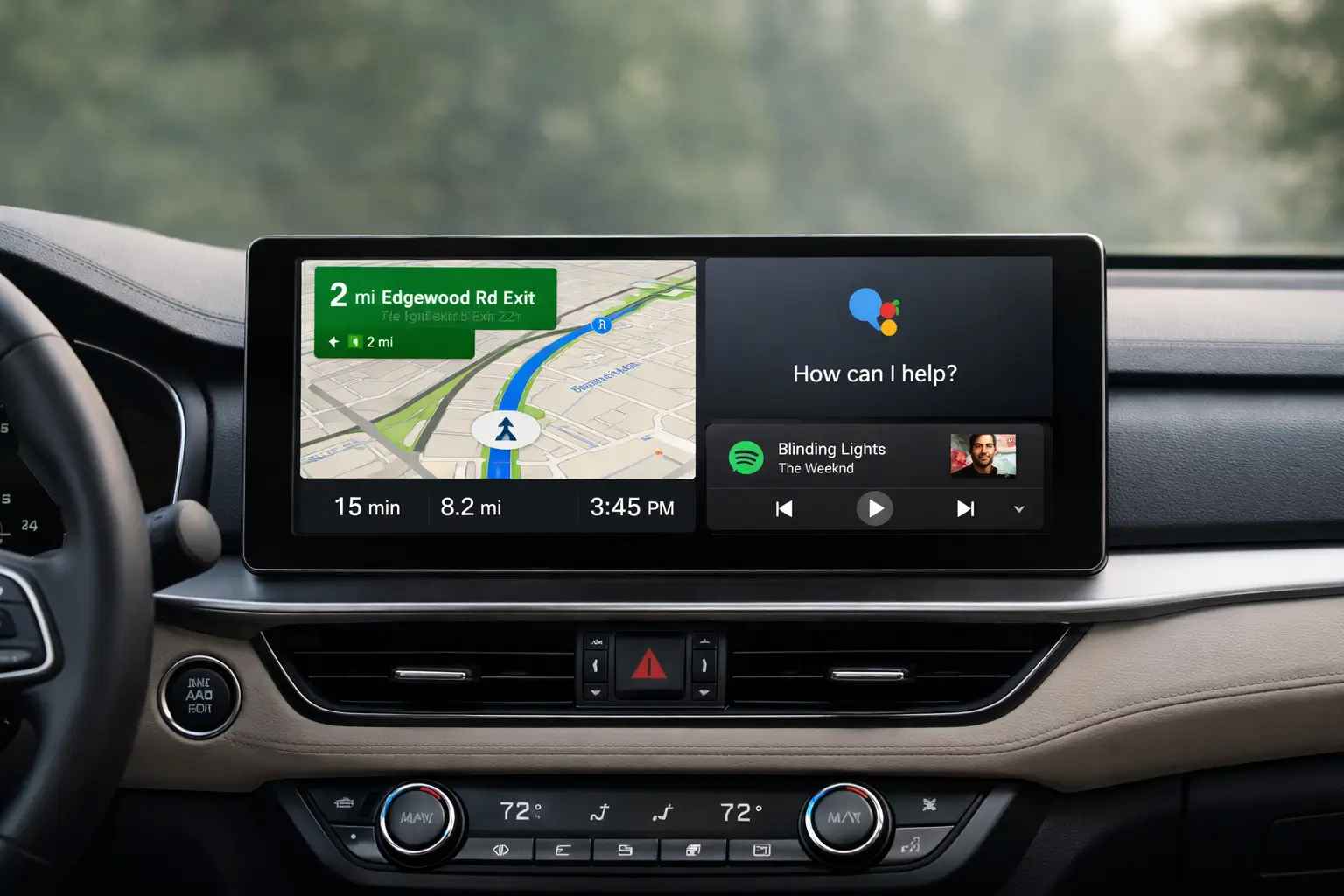
A few years ago, android auto was mostly about mirroring maps and music from your phone onto a car screen. Useful, yes—but limited. Today, something more subtle and important is happening. Android Auto is becoming context-aware, faster, and more deeply connected to how people actually drive.
This matters now because cars are no longer isolated machines. They are connected environments where navigation, communication, safety, and entertainment intersect. As vehicles add larger displays and smarter software, Android Auto is quietly evolving from a “phone projection tool” into a central driving companion—one that adapts to routines, understands intent, and reduces friction behind the wheel.
This article explains how Android Auto is becoming smarter inside cars, what features are driving this change, and what it means for everyday drivers, professionals, and the future of in-car technology.
What Android Auto Was Originally Designed to Do
When Android Auto first appeared, its mission was simple: reduce distraction while driving.
Its core design principles included:
- Large, readable text and buttons
- Minimal visual clutter
- Voice-first interactions
- Limited app access for safety
Early versions focused on three essentials:
- Navigation (primarily Google Maps)
- Communication (calls and messages)
- Media playback (music and podcasts)
For its time, this was enough. But as smartphones became smarter and cars became more digital, expectations changed.
Why “Smarter” Matters Inside Modern Cars
Modern cars now feature:
- Wide, high-resolution infotainment displays
- Always-connected internet systems
- Built-in vehicle sensors and data
- Driver assistance and safety systems
In this environment, static mirroring feels outdated. Drivers expect systems that:
- Anticipate needs
- Reduce manual input
- Adapt to driving context
- Save time and mental effort
This is where Android Auto features have begun to evolve beyond basics.
Smarter Navigation: More Than Just Directions
Navigation remains the most used Android Auto function, but it is no longer just about point-to-point routing.
Context-Aware Routing
Android Auto now factors in:
- Real-time traffic patterns
- Road closures and incidents
- Frequent destinations (home, work, gym)
- Time of day and routine behavior
For example:
- Morning commute suggestions appear automatically
- Alternate routes are proposed proactively
- Arrival time updates adjust dynamically
Multi-Stop and Predictive Suggestions
Instead of re-entering destinations, Android Auto can suggest:
- Fuel stops on long routes
- Coffee stops during early commutes
- Parking near final destinations
This shift reduces decision fatigue while driving.
Voice Intelligence Is Getting More Natural
Voice control is where Android Auto is making its biggest intelligence leap.
From Commands to Conversations
Earlier versions required rigid phrasing. Today, drivers can speak more naturally:
- “Text Rahul I’ll be late by ten minutes”
- “Find a fuel station on the way”
- “Play something calm”
The system interprets intent rather than exact words.
Hands-Free by Default
Smarter voice handling means:
- Fewer screen touches
- Reduced distraction
- Faster task completion
For safety-focused driving, this evolution is critical.
Smarter Media and Content Control
Media playback is no longer just play and pause.
Adaptive Recommendations
Android Auto increasingly:
- Resumes podcasts where you left off
- Suggests playlists based on time and mood
- Prioritizes shorter content during short trips
Unified Media Experience
Instead of switching between apps, Android Auto:
- Groups audio sources logically
- Remembers preferences per driver
- Maintains continuity across drives
This creates a seamless in-car audio experience without constant adjustments.
Better Integration With the Car Itself
One of the most important changes is how Android Auto interacts with vehicle hardware.
Steering Wheel and Display Integration
Modern implementations allow:
- Steering wheel button customization
- Cluster display navigation prompts
- Heads-up display directions (in supported cars)
Android Auto is no longer confined to the center screen.
Wireless Android Auto Improvements
Wireless support has become:
- More stable
- Faster to connect
- Less battery-intensive
This makes everyday use frictionless, especially for short drives.
Safety-Driven Intelligence Improvements
Smarter does not mean more distracting.
Driving-Focused Interface Changes
Android Auto now:
- Limits notifications while driving
- Prioritizes urgent messages
- Adjusts interface density based on speed
Reduced Cognitive Load
Features are designed to:
- Minimize choices on screen
- Present only relevant actions
- Use voice instead of visuals
The goal is not to add features, but to remove unnecessary effort.
Android Auto vs Built-In Car Software
Many cars now ship with their own operating systems. So why does Android Auto still matter?
Familiarity and Trust
Drivers already know:
- Their apps
- Their contacts
- Their navigation preferences
Android Auto carries that familiarity into any compatible car.
Faster Updates
Built-in systems often:
- Update slowly
- Depend on manufacturers
- Become outdated quickly
Android Auto updates regularly, improving features without replacing hardware.
Real-World Use Cases: How Drivers Actually Benefit
Daily Commuters
- Automatic route suggestions
- Faster traffic avoidance
- Seamless audio transitions
Long-Distance Travelers
- Predictive stops
- Reliable navigation
- Reduced fatigue
Professionals and Rideshare Drivers
- Efficient message handling
- Accurate ETA sharing
- Minimal screen interaction
These practical benefits explain why Android Auto adoption continues to grow.
Limitations and Areas Still Improving
Despite progress, Android Auto is not perfect.
Current Drawbacks
- App availability is still limited
- Wireless stability varies by car
- Deep vehicle controls remain restricted
Why These Limits Exist
Most constraints are intentional:
- Safety regulations
- Manufacturer control
- Distraction reduction policies
The focus remains on driving safety over feature overload.
What the Future of Android Auto Likely Looks Like
Based on current trends, Android Auto is moving toward:
- Deeper AI-driven suggestions
- Better integration with car sensors
- Personalized driver profiles
- Smarter multi-screen support
Rather than replacing car systems, it is becoming a smarter layer that adapts to them.
Frequently Asked Questions (FAQ)
What is Android Auto used for?
Android Auto allows drivers to use navigation, calls, messages, and media safely on a car’s display using their Android phone.
Is Android Auto getting smarter over time?
Yes. Regular updates improve voice control, navigation intelligence, and integration with vehicles.
Does Android Auto work without the internet?
Basic functions may work, but navigation, traffic updates, and voice features require an internet connection.
Is wireless Android Auto better than wired?
Wireless is more convenient, but wired connections are sometimes more stable depending on the car.
Can Android Auto control car features?
Limited controls are supported, but most vehicle functions remain managed by the car’s native system.
Is Android Auto safe to use while driving?
Yes. It is designed with safety guidelines, voice control, and minimal visual interaction.
Does Android Auto drain phone battery?
Wireless use can consume more battery; wired connections usually charge the phone.
Will Android Auto replace car infotainment systems?
No. It complements them by providing a familiar, frequently updated interface.
Conclusion: A Smarter Companion, Not a Louder One
Android Auto’s evolution is not about flashy features or radical redesigns. It is about intelligence applied quietly—anticipating needs, reducing effort, and making everyday driving smoother.
By focusing on context, voice interaction, and safety-first design, android auto is becoming smarter in ways that actually matter. For drivers, that means less thinking, fewer taps, and more confidence on the road.
As cars continue to become digital spaces, Android Auto’s role as a calm, adaptive companion is only becoming more relevant.
Disclaimer
This article is for informational purposes only. Feature availability may vary by region, vehicle model, and Android version. Always follow local driving laws and manufacturer guidelines.